What Industrial Tablet Accessories Are Worth Having? Mounts, Scanners, Keyboards and Field Power Solutions
Even a perfectly chosen industrial tablet won't deliver the expected performance if it isn't matched to the operator's real working conditions. On the production floor, in a warehouse or in a logistics center, what matters isn't just the device's specifications, but also ease of use, a stable mount, fast data entry and uninterrupted access to power. It is precisely the right accessories for industrial tablets that turn the device into a practical tool supporting everyday processes.
A forklift operator needs different solutions than an employee picking orders, and a technician carrying out equipment inspections in the field needs different ones still. In one case, the key element will be a shock-absorbing mount for the industrial tablet, which keeps the device stable and reduces the impact of vibration. In another, what matters most will be an efficient barcode scanner for the industrial tablet, allowing fast reading of dirty, damaged or distant labels.
A well-designed set of accessories can reduce equipment damage, shorten the time needed to complete operations, improve workstation ergonomics and lower the risk of downtime. Later in this article, we present mounts, scanners, docking stations, keyboards and power solutions that genuinely increase the functionality of industrial tablets and help maintain continuity of work.

Protective Cases and Covers - an Extra Layer of Safety Beyond the IP Rating
Although rugged industrial tablets are designed for use in harsh conditions, additional protective cases and covers significantly increase their durability during everyday use. They serve three key functions:
- Impact absorption - reinforced corners made from special elastomers absorb and disperse impact energy when the device is dropped onto a concrete floor or metal machine parts.
- Improved work ergonomics - integrated hand straps and shoulder straps make it easier to safely use the tablet with one hand for many hours, reducing fatigue and the risk of accidentally dropping it.
- Protection for ports and connectors - physical covers shield unused ports from grinding dust, metal shavings, moisture and other contaminants.
A case for an industrial tablet is therefore not just an aesthetic add-on, but an extra layer of protection that goes beyond what the IP rating provides.

Mounts and Holders - the Tablet Always Where the Employee Needs It
The mobility of an industrial tablet is a major advantage, but at many workstations a stable, secure and ergonomic mount is just as important. The right mounts and holders provide:
- Device stability - solid mechanical locks prevent the tablet from falling out during sudden braking, turning or driving on uneven surfaces.
- Protection against vibration - damping systems absorb vibrations generated by the engine and vehicle operation, protecting the motherboard and its soldered connections from damage.
- Operator safety - a properly mounted tablet doesn't obstruct visibility during maneuvering and doesn't create an additional accident risk.
- Convenient access to the device - the screen stays within the employee's line of sight and reach, making it easier to operate warehouse systems and carry out ongoing tasks.
Mounts installed on forklifts face particularly high requirements. They must combine effective vibration damping, strong device protection and an ergonomic placement in the operator's cabin.

External 1D and 2D Scanners — When the Built-in Camera Can't Keep Up
The built-in camera is enough for taking reference photos, but it doesn't provide adequate scanning speed for intensive warehouse work. A professional barcode scanner for an industrial tablet can significantly speed up goods handling and reduce the number of errors. Its most important advantages are:
- Instant code reading - advanced optics allow 1D and 2D codes to be scanned in a fraction of a second, without the need for lengthy focusing.
- Effectiveness in difficult conditions - the scanner works reliably in poorly lit aisles and reads dirty, wet or damaged labels.
- Long-range scanning - Long Range models can read codes located as far as ten or more meters from the operator.
- Reading codes under film - professional modules can handle labels placed under several layers of stretch film.
- Flexible connection to the tablet - the scanner can communicate with the device via Bluetooth or a physical port.
- Convenient integration with the workstation - the scanner can work together with a tablet mounted in a suitable industrial tablet holder, giving the operator quick access to data.
An external scanner is therefore an essential element at workstations where speed, reliability and a high frequency of code reading matter most.

Ring and Wrist Scanners - Free Hands During Order Picking
In the order-picking process, every unnecessary action reduces efficiency. Ring and wrist scanners let an employee operate the WMS system without constantly putting down and picking up the tablet. The main benefits of this solution are:
- Both hands free - a ring scanner worn on the finger allows codes to be scanned with a button operated by the thumb, without interrupting the carrying or packing of goods.
- Fast communication with the tablet - a Bluetooth Low Energy connection ensures efficient data transfer with low power consumption.
- Shorter picking time - the employee doesn't need to put the device down before picking up a box or reach for it again when registering a product.
- Real-time access to the pick list - a tablet mounted on the forearm or hip belt acts as a mobile operations hub, displaying successive tasks from the WMS system.
- Better equipment protection - a properly chosen case for the industrial tablet protects the device from impacts, dirt and accidental damage during intensive work.
- Convenient charging after a shift - a docking station for the industrial tablet allows quick recharging, data synchronization and preparation of the device for the next employee.
Ring scanners, combined with a properly mounted tablet, streamline order picking, reduce unnecessary movements and improve the warehouse worker's ergonomics.
RFID and NFC Readers - Identifying Pallets, Tools and Employees Without Scanning
RFID and NFC technologies make it possible to identify products, tools and employees without having to manually scan every marking. Combined with an industrial tablet, they streamline automation and reduce the number of actions the operator has to perform. Their most important applications are:
- Bulk reading of RFID tags - an external UHF RFID reader can register many tagged products on a pallet at the same time.
- Identification from a distance - the operator doesn't need to approach every label or precisely aim the device at the code.
- Faster inventory checks - simply walking past a pallet or a shelf is enough for the system to automatically register the presence of tagged items.
- Employee authorization - NFC technology allows quick identity confirmation for operators at machine stations.
- Tool circulation control - proximity tags make it easier to record tool pickups, returns and current location.
- Identification of molds and production equipment - NFC and RFID support contactless tracking of injection molds, components and other plant assets.
RFID and NFC readers reduce the number of manual operations, speed up the flow of data and increase control over resources in an industrial plant.

Docking Stations - a Charged Tablet, Ready for Every Shift
Damaged charging ports are a common reason for taking tablets out of service. A professional docking station for an industrial tablet reduces port wear, streamlines charging and allows the device to be quickly prepared for the next shift. Its most important advantages are:
- Protection for the charging port - the tablet simply needs to be placed in the station, with no need to plug in and unplug a USB-C cable each time.
- Durable Pogo-Pin contacts - brass connectors resist dust, moisture and thousands of insertion and removal cycles.
- Fast charging between shifts - a fixed place to put the device down increases the likelihood that the tablet will be charged and ready for the next employee.
- Expanded connectivity - the station can act as a port replicator, allowing a LAN, a monitor, a label printer and other peripheral devices to be connected.
- Stationary-mode operation - a connected keyboard for the industrial tablet allows larger amounts of data to be entered comfortably and turns the tablet into a full computer workstation.
- Power in vehicles and in the field - a shock-resistant charger for the industrial tablet with a 12/24 V automotive connector or a reinforced magnetic cable allows recharging away from the plant.
A well-chosen docking station, keyboard and charger together create a complete workstation that increases device availability and reduces the risk of costly damage.
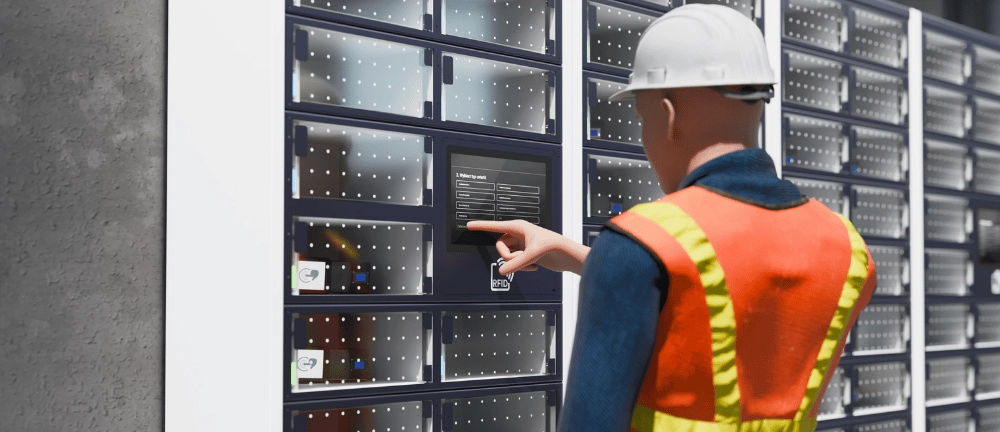
Charging Racks - Central Management for an Entire Tablet Fleet
With a fleet of several dozen or several hundred devices, simply charging the tablets stops being a simple task and becomes a process that requires organization and control. Charging racks and cabinets help keep equipment storage organized and ensure it's ready for every shift. Their most important advantages are:
- A fixed place for every device - each tablet has an assigned, numbered slot, which reduces the risk of losing equipment.
- Centralized charging for the whole fleet - many devices can be charged at the same time in one organized location.
- Ready for the start of the shift - properly stored tablets are charged and prepared for work for the next group of employees.
- Battery protection - smart power-management systems prevent overcharging and control thermal conditions during charging.
- Access control - lockable cabinets can be opened with a key, a code or an employee's NFC card.
- Greater user accountability - assigning devices and storage slots makes it easier to track pickups and returns.
- Order and safety - racks eliminate tangled cables, accidental disconnection of chargers and equipment being put down in an uncontrolled way.
Implementing charging racks increases tablet availability, reduces equipment losses and makes it possible to manage the entire device fleet more effectively.

Hot-Swap Replaceable Batteries- Zero Downtime When a Device Runs Low
In plants operating in shifts, a tablet needs to stay available around the clock. Hot-swap replaceable batteries make it possible to maintain continuity of work without interrupting processes, powering down the device or closing running applications. The main advantages of this solution are:
- Battery replacement without powering down the tablet - a depleted battery can be swapped for a charged one while the device keeps running normally.
- No loss of data or active sessions - production, warehouse and system applications keep running throughout the swap.
- Emergency backup power - a small internal battery powers the tablet for several dozen seconds, allowing the main battery to be swapped safely.
- Elimination of downtime - the employee doesn't need to put the device aside for several hours or wait for it to recharge.
- 24/7 continuity of work - the tablet can be used across successive shifts without operational interruptions.
- Simple battery rotation - depleted batteries go into a multi-bay charger, and charged cells are immediately fitted in their place.
- Better fleet utilization - instead of keeping extra tablets on hand for charging time, a company can manage a supply of spare batteries instead.
Hot-swap technology proves especially valuable on production lines, in warehouses
Industrial Keyboards - Precise Data Entry Without Touchscreen Errors
Entering long serial numbers, technical parameters and service notes on a touchscreen can be inconvenient and error-prone. A well-chosen keyboard for an industrial tablet improves work precision and makes the device easier to use in a demanding environment. Its most important advantages are:
- Fewer errors - physical key travel provides clear confirmation of each press and allows for more accurate data entry.
- Convenient use in difficult conditions - the keyboard stays functional even when the operator's hands are damp, dirty or wearing work gloves.
- Resistance to water and dirt - a high IP rating allows safe washing and disinfection, and in select models even brief submersion.
- Resistance to chemicals - housings made of medical-grade silicone or specialized plastics hold up well against contact with oils, detergents and disinfectants.
- Flexible mounting - the keyboard can be attached magnetically, connected as a separate accessory or integrated into a protective case.
- 2-in-1 mode capability - a case with a keyboard and a friction hinge lets you turn the tablet into a rugged, laptop-like workstation.
An industrial keyboard proves its worth wherever speed, accuracy and the ability to comfortably enter larger amounts of data matter.

Industrial Styluses and Touch Gloves - Operating the Screen Without Removing Hand Protection
Health and safety requirements often prevent employees from removing protective gloves while operating devices. Industrial styluses and a properly chosen glove for the industrial tablet make it possible to use the screen without giving up hand protection. The main advantages of these solutions are:
- Screen operation with gloves on - special operating modes, such as glove mode or rain mode, increase the sensitivity of the touch panel.
- Compliance with health and safety rules - the employee doesn't need to remove hand protection to operate an application, confirm a task or enter data.
- Precise interface control - a conductive glove allows buttons to be pressed and the system to be navigated without losing comfort at work.
- Accurate document signing - active and passive styluses make it easier to sign delivery reports and service forms.
- Convenient drawing and note-taking - the stylus makes it possible to create sketches, mark elements on diagrams and precisely describe faults.
- Easy handling of small elements - the stylus's thin tip makes it easier to select small icons and form fields.
- Protection against losing the accessory - a steel or flexible coiled tether allows the stylus to be securely attached to the tablet's housing.
Combining a sensitive screen, touch gloves and an industrial stylus increases safety, accuracy and convenience when operating devices in a demanding work environment.
Well-designed accessory ecosystem is the missing link between buying hardware and achieving real performance on the production floor. If you want to be sure your fleet of mobile devices is optimally matched to the specifics of your plant's processes, get in touch with our experts. We'll advise you on how to put together and deploy complete hardware solutions. Check out our offer and choose the best industrial tablets together with a full package of accessories that support the continuity of your business's operations.




blog posts