Industrial Tablets in Modern Business - a Complete Guide to Selection, Systems, and Applications
Digitization and automation of business processes are no longer the sole domain of modern offices. Today, critical data is generated and processed directly on production lines, in logistics centers, on rail sidings, and in harsh field conditions. Implementing ERP, WMS, MES, or SCADA class systems requires employees to have constant access to digital interfaces. Yet attempting to use traditional consumer-grade hardware in these environments almost always ends in failure.
Picture a simple scenario: a service technician drops a device onto a concrete floor, metal dust from a nearby grinder settles on the screen, and moisture in a cold store causes an immediate short circuit in the USB-C charging port. Under such conditions, traditional equipment suffers permanent damage within just a few days, generating high downtime and service costs. This is exactly why modern enterprises invest in solutions dedicated to the Enterprise sector. Professional industrial tablets in the workplace fill the missing link in IT architecture, guaranteeing operational continuity where standard technology fails.

What Is an Industrial Tablet and How Does It Differ From a Consumer One?
Many managers, at the start of their digital transformation journey, ask themselves: wouldn't it be simpler and cheaper to buy a standard tablet at an electronics store and enclose it in a thick rubber case? The answer is no. The difference between mass-market and industrial hardware lies deep within the devices' design architecture.
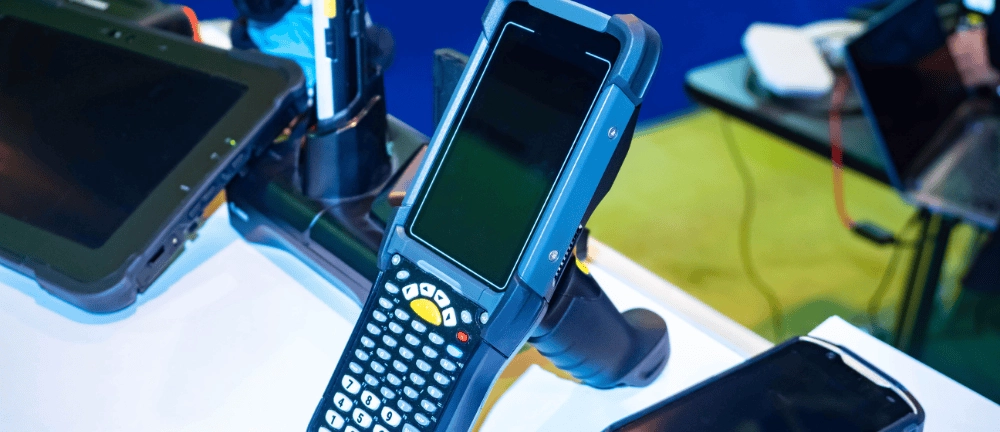
Visually, a rugged-style case catches the eye, but a genuinely rugged industrial tablet is designed from the ground up to survive extreme challenges. The bodies of these devices are built from magnesium alloys or aerospace-grade aluminum, with key corners protected by thick, impact-absorbing elastomers. Unlike commercial devices, where minimal thickness and low weight are what matters most, structural integrity is the top priority of industrial design.
Another barrier is the screen. A typical consumer tablet becomes unreadable in full sunlight, and its touch panel responds only to a dry finger. The displays of industrial devices feature advanced polarizing filters, anti-reflective coatings, and extremely high-brightness screens. What's more, the digitizer is designed to flawlessly register touch input from an employee wearing thick work gloves, or even when raindrops or coolant land on the screen.
The last distinguishing factor - though a fundamental one for IT directors - is the product lifecycle. A commercial business tablet bought at a retailer disappears from shelves after a year, replaced by a new model with different dimensions, which renders the purchased fleet of docking stations or car mounts obsolete. Industrial devices are characterized by guaranteed hardware availability and service support for 5, 7, or even 10 years from their launch.

Where Are Industrial Tablets Used? An Overview of Applications
Versatility and modularity mean that applications for industrial tablets can be found in virtually every branch of the modern economy where staff mobility and instant information exchange are critical.
Production Floor - Instructions, Quality Control, Line Reports
On the production floor, a tablet is dropped on average once a week, and it faces constant contact with machine coolant, strong press vibrations, and ever-present, electrically conductive metal dust. In such a demanding environment, an industrial tablet on the production floor serves as the operator's mobile command center. Instead of paper, perpetually dirty workstation instructions, employees see interactive 3D models of the components being assembled right on screen. A device integrated with the MES system lets them report the completion of successive production batch stages in real time, flag machine failures, and carry out rigorous quality control procedures directly at the workstation. Choosing the right industrial tablet for a production facility eliminates the risk that a single device failure will halt an entire assembly line.
Warehouse and Logistics - Order Picking, Inventory, WMS
The warehouse environment is a space of constant movement, heavy dust, and extreme temperatures - from the heat under a sheet-metal hall roof to sub-zero temperatures in freezer zones. Rolling out a modern WMS system requires a tool that can meet these challenges. An industrial tablet deployed in a warehouse is very often mounted on forklifts using dedicated shock-absorbing brackets. Powered directly from the forklift's electrical system and equipped with an integrated long-range barcode scanner, the device lets operators identify and receive pallets from the highest high-bay racking without ever leaving the cab.
Service and Maintenance - Repair History, Technical Schematics in the Field
For technicians and engineers responsible for keeping infrastructure running, a reliable field tablet is essential. Whether the repair takes place in a deep excavation during heavy rain or atop a telecom mast in full sun, the equipment has to work. A professional industrial tablet for mobile service staff provides instant access to complete electrical wiring diagrams, CAD technical documentation, and the repair history of a specific device. Thanks to built-in GPS modules and high-resolution cameras, a service technician can run a video consultation with a headquarters expert, sending live footage of the fault in real time.
Transport and Delivery - Confirmations, Signatures, Navigation
In transport logistics, mobile devices are subjected to constant high-frequency vibration. Consumer micro-USB or USB-C charging connectors quickly wear out and break under road vibration. Industrial-class tablets solve this problem with magnetic Pogo-Pin connectors on dedicated docking stations in truck cabs. Drivers use them for fleet navigation, receiving dispatch orders, and collecting customers' digital signatures when confirming delivery (Proof of Delivery).
Retail and Commerce - Customer Service, Mobile Sales, POS
In the retail sector and modern commerce, aesthetics matter, but so does absolute reliability during sales peaks (such as Black Friday). Industrial tablets excel as mobile points of sale (mPOS), as tools for quickly checking shop-floor stock levels used by sales advisors, and as customer service devices in drive-thru zones, where staff work outdoors regardless of rain or temperature.

Which Operating System Should You Choose for an Industrial Tablet?
The choice of system software determines not only how easy deployment will be, but also the entire organization's IT security architecture. When choosing an industrial tablet for your company, you face a dilemma: Android or Windows? Both platforms have their own unique technological advantages.
| Feature / Operating System | Android | Windows |
| Main Purpose | Simple mobile apps, WMS and POS systems, field data collection | Advanced desktop applications, SCADA and ERP systems, full CAD suites |
| Management and Security | Easy mass deployment via MDM (Mobile Device Management) systems | Full integration with the corporate Active Directory domain, Windows Update for Business |
| Hardware Requirements | Easy mass deployment via MDM (Mobile Device Management) systems Low RAM and processor demands - longer battery life | Higher hardware requirements (x86 architecture), greater computing power needed |
| User Interface | Naturally optimized for touchscreens and mobile work | Traditional desktop, often requires a stylus or precise touch interface |
Android has the advantage in environments where the speed of a dedicated application, a lightweight interface, and ease of use matter most. It is the dominant system in warehouse logistics and retail. Windows, meanwhile, is an indispensable foundation in maintenance departments and on advanced production lines. It allows the same software engineers use on desktop computers to run seamlessly, without the need for costly application code rewrites for mobile platforms.
How to Read an Industrial Tablet's Technical Specification
When comparing offers on the market, IT managers and procurement specialists need to work with concrete engineering indicators. Here are the key parameters that determine a device's class:
- IP (Ingress Protection) rating. It consists of two digits. The first (0-6) indicates dust resistance - in industry, the absolute standard is the digit 6 (complete dust-tightness). The second digit (0-9) indicates water resistance. The IP65 standard guarantees protection against water jets from any direction, while the IP67 class means the tablet can survive full immersion in water to a depth of 1 meter for 30 minutes.
- MIL-STD-810G / MIL-STD-810H certification. This is a rigorous US military standard. A device holding this certification has successfully passed tests including repeated drops onto concrete from every edge and corner (typically from a height of 1.2 to 1.5 meters), resistance to ballistic shock, extreme thermal shock, and prolonged low-frequency vibration. (You can read more about the nuances of military testing and ingress-protection standards in our dedicated supporting article on durability standards).
- Display brightness (nits). Traditional tablets have a brightness of around 300-400 nits. If the equipment needs to work outdoors, look for models with a Sunlight Readable specification and a brightness of at least 800–1000 nits. An additional advantage is optical bonding technology, which eliminates the air gap between screen layers, drastically reducing glare.
- Processor and RAM performance. For Windows systems, Intel Core i5/i7 processors backed by a minimum of 8 GB or 16 GB of RAM are the optimal choice for guaranteeing multitasking. For Android systems, modern eight-core ARM processors combined with 4-6 GB of RAM ensure ideal application smoothness.
What Functions and Modules Are Worth Checking Before Buying?
An industrial tablet is a modular device that can be tailored to the precise requirements of a given workstation. Before purchasing, it's worth verifying the presence of the following key hardware modules:
- Dedicated 1D/2D barcode reader. Using the built-in camera to scan barcodes in industrial conditions is inefficient - the camera focuses slowly and struggles with dirty or damaged labels. Professional tablets integrate hardware scan engines (e.g. from Zebra or Honeywell) that read a code in milliseconds, even in total darkness.
- Hot-swap battery. This feature allows a depleted battery to be swapped for a new one without turning the device off or closing running applications. An internal miniature capacitor maintains system power for several dozen seconds, which is essential for uninterrupted work in shift-based operations.
- Custom input/output (I/O) ports. Older-generation production machines often require configuration via traditional connectors. Industrial tablets offer physical RS232 (COM) ports, full-size RJ45 Ethernet sockets, and RFID/NFC modules integrated directly into the housing.
Don't forget the accessory ecosystem, either. Staff ergonomics are improved by dedicated hand straps, four-point harnesses, active vehicle docking stations, and multi-bay chargers for spare batteries. (You'll find a broad overview of solutions that make everyday equipment use easier in our separate article on industrial tablet accessories.)
What Sets Antumo Industrial Tablets Apart in the Market?
Choosing a technology partner that supplies hardware solutions for business is just as important as the device specification itself. For years, the Antumo brand has been delivering uncompromising mobile solutions for the most demanding branches of industry, logistics, and transport.
When you buy equipment from Antumo, you don't just receive a box with a device inside. Our team of engineers and business advisors carries out a comprehensive audit of your company's working environment, helping to precisely configure devices to meet the specific requirements of your IT systems and the real physical hazards present at workstations. We offer flexible hardware configurations, a wide range of mounting accessories, and a guarantee of continued supply of identical models for many years to come.
Crucially for keeping your business running smoothly, we provide full after-sales support. We have a technical service center based in Poland with fast response times, which minimizes any repair time to an absolute minimum.
Digitizing and automating processes with mobile devices is a proven path to greater efficiency and lower operating costs in any enterprise. Success, however, depends on choosing tools that can withstand the realities of your working environment. Go to the category page for Industrial Tablets, review the specifications of our devices, or contact an Antumo advisor directly, who will prepare a dedicated, free quote for your company and select equipment tailored to your business's challenges.




blog posts