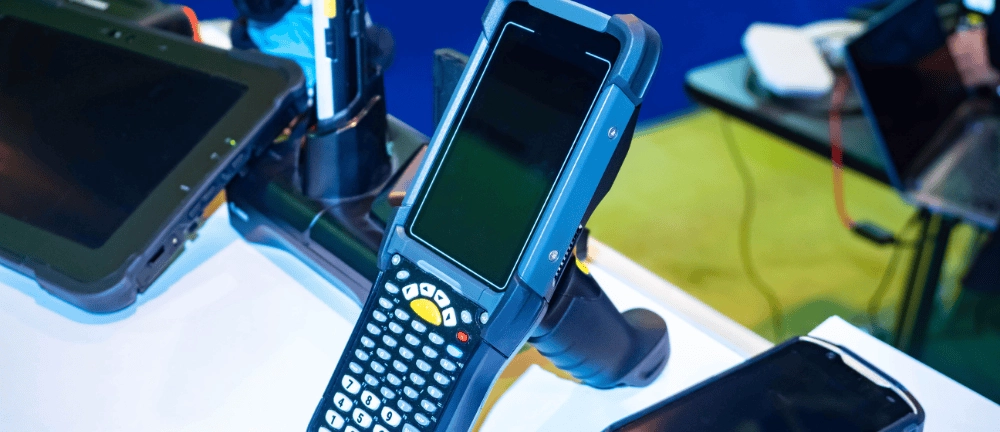
How to Extend the Lifespan of Industrial Tablets in Your Facility? Maintenance, Updates, and Fleet Replacement
The lifespan of industrial tablets depends not only on a rugged housing, IP rating, or drop resistance. Equally important is how the devices are updated, serviced, and monitored throughout their entire service life. Our experience with implementations in manufacturing facilities and warehouses shows that a properly managed industrial tablet lifecycle can last as long as 5–7 years, while minimizing failures, downtime, and unplanned costs.
How long do industrial tablets last under real-world working conditions? What accelerates their wear and tear the most? When does maintenance cease to be cost-effective, and when should you begin replacing your fleet of industrial tablets? In this article, we show how an expert approach to device management—including an MDM system, diagnostics, maintenance, a stock of replacement equipment, and planned upgrades—can extend the operational life of your fleet and effectively reduce its total cost of ownership.
Read on to find out what measures you should implement to ensure your industrial tablets operate reliably for many years, and that a single failure does not disrupt the continuity of production or warehouse processes.

How long should an industrial tablet last, and what shortens its lifespan?
The question of how long industrial tablets last comes up every time IT infrastructure budgets are planned. Unlike commercial devices, whose business usefulness ends after two years, the optimal lifecycle of an industrial tablet ranges from 5 to as many as 7 years. This durability stems directly from the use of embedded-grade components with extended lifespans and designs capable of withstanding extreme physical conditions.
But what shortens this lifespan the most? The primary factor is high-frequency microvibrations, to which devices mounted in vehicle mounts (e.g., on forklifts) are exposed. Without proper vibration damping, these vibrations lead to microcracks on the motherboard and damage to the power ports. The second enemy is industrial chemicals—the use of aggressive cleaning agents destroys the housing seals, compromising the equipment’s watertightness. The third, intangible threat is a lack of attention to software maintenance. Neglected or infrequent software updates for industrial tablets lead to slower system performance, conflicts with new versions of WMS/MES systems, and create security vulnerabilities that threaten the entire plant network.

How can you keep your tablet in top condition during its first few years of use?
Maximizing uptime requires implementing precise device management procedures starting from the very first day of fleet deployment.
How do MDM policies automate updates and prevent system degradation?
Manually managing a fleet of several dozen or several hundred devices operating in three shifts is inefficient and costly. In this area, MDM (Mobile Device Management) systems, such as the proprietary Antumo MDM System, play a key role. They enable centralized and fully automated deployment of security patches, configuration of permissions, and monitoring of application behavior. Thanks to MDM policies, you can block the installation of unauthorized programs, restrict web browser use exclusively to internal systems, and schedule the distribution of updates during system downtime. This protects the operating system from clutter, stabilizes its operation, and blocks potential pathways for malware infection.
How can you monitor the condition of the battery, screen, and ports before failures occur?
Modern infrastructure management is based on predictive diagnostics. Instead of waiting for a report from an employee, monitoring systems collect real-time telemetry data on battery cell wear (SOH—State of Health). If the battery capacity drops below 75%, the system automatically alerts the IT department that the battery needs to be replaced before the next shift. Equally important is the regular physical inspection of charging ports and the condition of the display panel. Detecting minor cracks along the edge of the touchscreen allows for a quick response before moisture penetrates the interior and permanently damages the electronics.
What cleaning and maintenance procedures actually extend the device’s lifespan?
Proper maintenance of industrial tablets should be part of the daily routine at the workstation. Operators should be trained in the use of dedicated cleaning agents. Only alcohol-free solutions that are safe for oleophobic coatings should be used to disinfect screens. Special attention should be paid to cleaning the Pogo-Pin charging contacts on the tablet’s casing and in docking stations. Dirt that accumulates there increases electrical resistance, leading to overheating of the contacts, slower charging, and damage to the power supply system. Regularly blowing out the ports with compressed air and wiping the contacts with special cleaning solutions significantly extends the device’s trouble-free operating time.
How can you manage breakdowns and maintenance without halting production?
Even top-of-the-line industrial tablets can be damaged as a result of extreme mechanical incidents, such as being run over by a heavy forklift or falling from a great height onto steel structural elements. The strategy for managing such incidents determines whether the failure of a single unit will paralyze logistics processes.
The foundation of a secure implementation is maintaining a buffer stock (at 5–10% of the entire fleet) in the IT warehouse. If a device is damaged, the employee does not have to wait for it to be repaired—the damaged unit is sent to the service center, and the operator immediately receives a preconfigured replacement device via the MDM profile, allowing them to resume their duties within minutes. Service response time plays a crucial role here. When selecting an equipment supplier, it is important to partner with a provider that offers local, rapid technical support. An SLA agreement, covering professional service and service packages, guarantees that industrial tablets will be repaired quickly, without the need to send the equipment to distant service centers abroad, which could take weeks.
When and how should you plan to replace your tablet fleet?
Every piece of technical equipment will eventually reach the end of its useful life. Understanding when to replace tablets in your company is key to avoiding a sudden increase in operating costs and maintaining process stability.
How can you tell that your fleet is nearing the end of its life before widespread failures begin?
The end of a device fleet’s lifecycle can be recognized even before widespread failures occur. The most common warning signs are:
- Declining battery performance – batteries discharge more and more quickly, and replacing them becomes uneconomical or impossible due to a lack of compatible cells on the market.
- Insufficient processor and RAM performance – devices cannot handle newer versions of business software.
- Slowdown of ERP or MES systems – a sluggish interface hinders daily work and directly reduces employee productivity.
- Expiration of security support – the manufacturer stops providing updates for Android or Windows.
- Limited availability of replacement parts – repairs become increasingly expensive, time-consuming, or impossible to perform.
How to plan a phased replacement without shutting down the plant?
A quick, comprehensive replacement of the entire industrial tablet fleet at once places a huge burden on IT and carries the risk of configuration errors on a massive scale. A phased migration is a safer solution. It’s a good idea to start the process by conducting pilot tests in a single, selected department (e.g., the packaging area in the warehouse). This helps identify any potential issues with application compatibility or Wi-Fi coverage on the new devices. Once the tests are successfully completed, the new equipment is gradually rolled out to other areas of the facility.
How to calculate TCO and justify the budget for a new fleet to management?
To convince management to invest in a new fleet, you should provide a comprehensive TCO calculation. Instead of focusing solely on the unit purchase price of the device, highlight the indirect costs generated by the aging fleet: losses resulting from employee downtime while waiting for the system to function, rising costs of post-warranty repairs for old models, or the risk of penalties for data breaches caused by a lack of security updates. Demonstrating that the cost of maintaining old devices exceeds the depreciation cost of a new fleet is the strongest business case.
If you need assistance in preparing a cost-benefit analysis for such a project, technical consulting experts will help you develop a reliable case study. Find out how professional strategic consulting can help you optimize the IT infrastructure at your facility.




blog posts